warmplane
Warmplane User Guide
Warmplane is a local control plane that maintains persistent Model Context Protocol (MCP) sessions.
It aggregates multiple upstream MCP servers behind a single runtime. It provides a compact, deterministic interface for tools, resources, and prompts over HTTP REST APIs, interactive Web UI, CLI commands, and stdio MCP server proxying.
This guide provides configuration references, deployment procedures, API specifications, and operational guidance for platform engineers and developers.
1. System Overview
Warmplane optimizes AI agent tool execution across three core technical dimensions:
- Startup latency: Eliminates per-call handshake overhead by maintaining persistent, warm connections to upstream MCP servers.
- Payload footprint: Reduces LLM context token usage by serving lightweight catalog indexes first and full schema details on demand.
- System determinism: Standardizes request envelopes, response structures, retry classifications, and error codes across heterogeneous upstream tools.
1.1 Understanding Run-Modes & Architecture Topologies
Warmplane provides flexible execution models depending on whether you want a zero-overhead desktop integration, a central persistent background service, or a shared network cluster:
| Run-Mode | Command | Host / Parent Process | Protocol & Port | Upstream Lifecycle | Primary Use Case |
|---|---|---|---|---|---|
| MCP Stdio Server Mode | warmplane mcp-server |
Spawned as child process by AI client (Claude Desktop, Cursor, Antigravity) | Standard I/O (JSON-RPC stdin/stdout) |
Kept warm inside child process while AI client is open | Zero background daemon needed. Direct desktop IDE integration. |
| HTTP Daemon Mode + Web UI | warmplane daemon |
Background service / systemd / terminal | HTTP REST (:9090) + Control Deck UI |
Kept warm continuously in the background daemon process | Web management UI, REST orchestrations, ChatOps webhooks. |
| Daemon Co-Hosted HTTP/SSE MCP | warmplane daemon (with mcpHttpServer) |
Same background daemon process | Streamable HTTP/SSE (:9191 or configured port) |
Shared with daemon lifecycle | Single persistent 24/7 daemon serving local or remote HTTP/SSE MCP clients. |
| Standalone MCP HTTP/SSE Server | warmplane mcp-http-server |
Dedicated server process | Streamable HTTP/SSE (:9191) |
Kept warm in server process | Headless network/remote agent clusters. |
| Embedded Rust Engine | EmbeddedWarmplane::start() |
In-process Rust application | Direct Rust structs & in-memory channels | Tied to host process lifetime | Embedded Rust agent applications (no child processes or HTTP). |
Architecture Topologies
Topology A: Direct Stdio Integration (No Daemon Required)
In this mode, your AI client (e.g., Claude Desktop, Cursor, Zed) spawns warmplane mcp-server directly as a subprocess. Warmplane boots upstreams in the background and speaks standard JSON-RPC over standard input/output (stdin/stdout). You do not need warmplane daemon running.
flowchart LR
    subgraph ClientProcess ["AI Client Process (Cursor / Claude Desktop / IDE)"]
        Agent["AI Agent / LLM"]
    end

    subgraph StdioProcess ["warmplane mcp-server (Subprocess)"]
        MCPFacade["MCP Stdio Facade\n(JSON-RPC stdin/stdout)"]
        SupervisorA["Supervisor Engine"]
    end

    subgraph UpstreamsA ["Upstream MCP Servers"]
        S1["server-1"]
        S2["server-2"]
    end

    Agent <-->|"stdin / stdout"| MCPFacade
    MCPFacade <--> SupervisorA
    SupervisorA <-->|"stdio / http"| UpstreamsA
Diagram fallback: 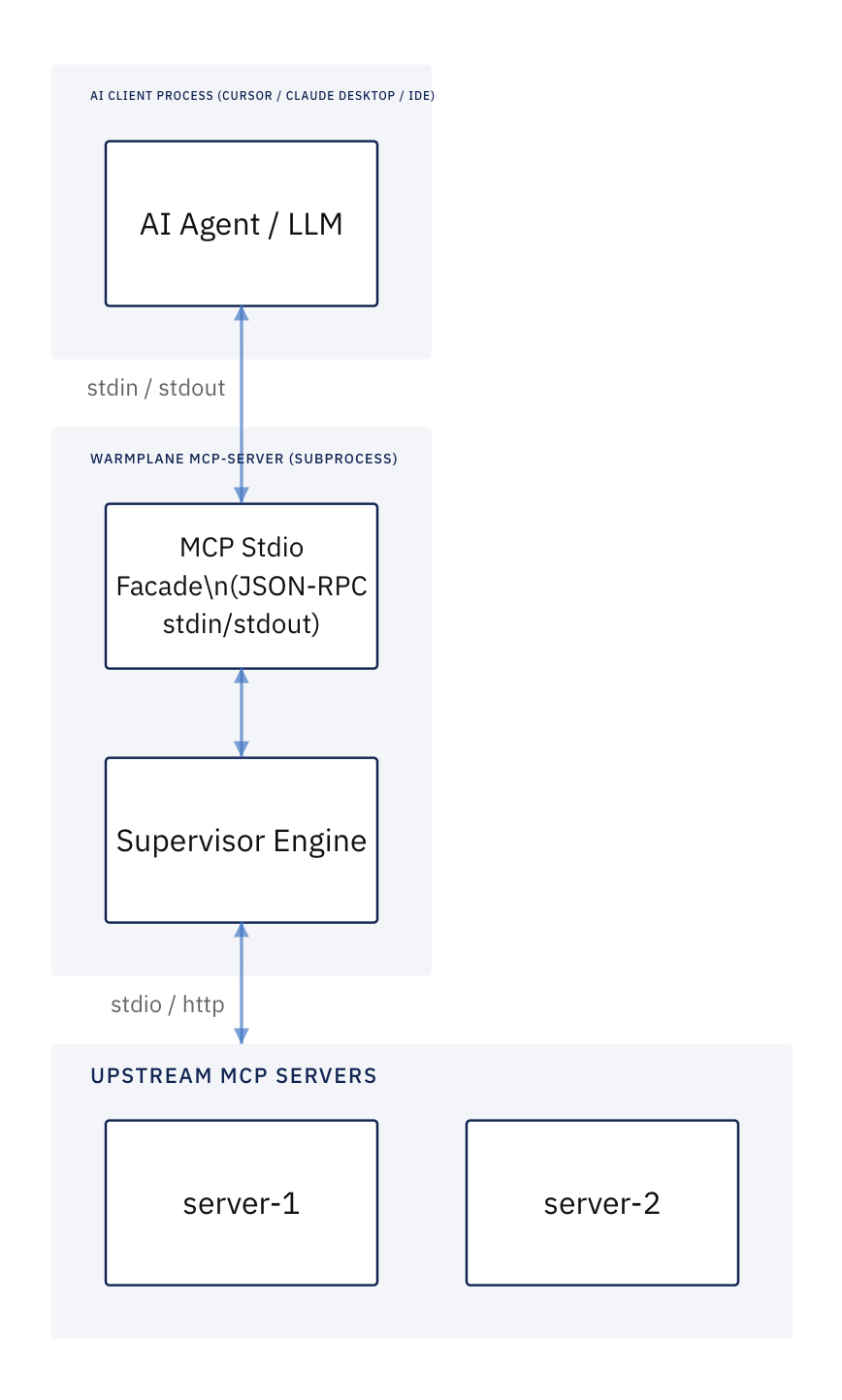
Topology B: Persistent Daemon with HTTP/SSE Client Connection
If you prefer a single long-lived daemon running 24/7 (avoiding per-client process spawns or serving multiple clients/remote hosts), start warmplane daemon with mcpHttpServer enabled. Clients connect to the daemon over Streamable HTTP/SSE (http://127.0.0.1:9191/sse).
flowchart TD
    subgraph Clients ["AI Clients & Web Users"]
        Desktop["Claude Desktop / Cursor\n(HTTP/SSE MCP)"]
        Browser["Operator Web Browser\n(Control Deck UI)"]
        Script["REST API Client / cURL"]
    end

    subgraph DaemonProcess ["warmplane daemon (PID: 1234)"]
        SSEFacade["Streamable HTTP/SSE MCP Facade (:9191)"]
        RESTFacade["HTTP REST API & Control Deck UI (:9090)"]
        SupervisorB["Shared Supervisor Engine"]
    end

    subgraph UpstreamsB ["Upstream MCP Servers"]
        U1["sqlite"]
        U2["github"]
        U3["semble-rs"]
    end

    Desktop <-->|"HTTP / SSE"| SSEFacade
    Browser <-->|"HTTP GET / UI"| RESTFacade
    Script <-->|"HTTP POST / REST"| RESTFacade
    SSEFacade <--> SupervisorB
    RESTFacade <--> SupervisorB
    SupervisorB <-->|"persistent connections"| UpstreamsB
Diagram fallback: 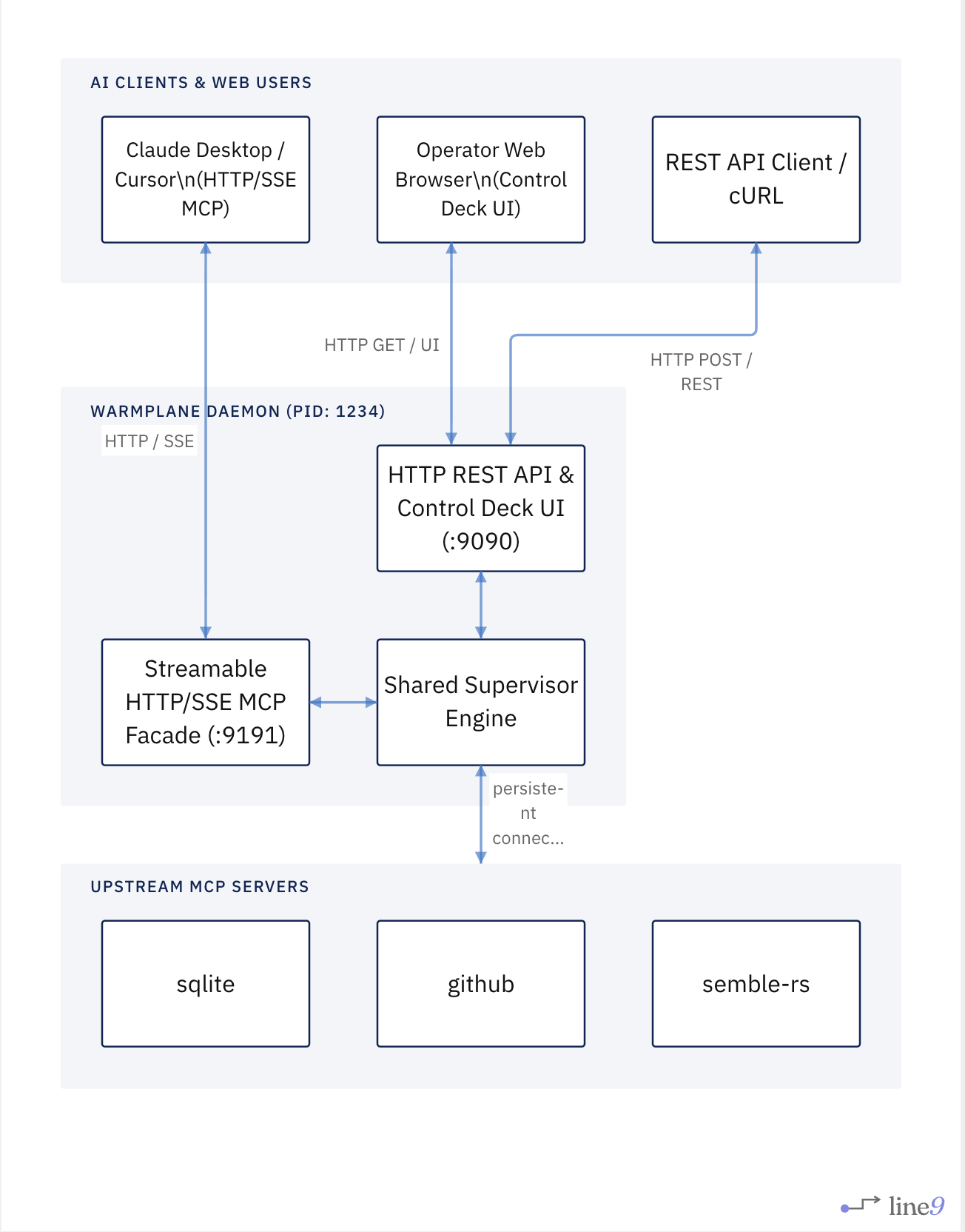
Topology C: Parallel Daemon and Stdio Processes (Shared State)
You can run warmplane daemon (for the Web UI on :9090) and simultaneously run warmplane mcp-server in your IDE. When pointed to the same configuration file path (e.g. --config /path/to/mcp_servers.json), both processes share the same upstream definitions, OS Keychain vault, and persist audit records to the common .warmplane/state/ store.
How Configuration & Hot-Reloading Interact
- Configuration Files: Both
warmplane daemonandwarmplane mcp-serveraccept--config <path>(defaulting tomcp_servers.jsonin the current working directory). When pointed to the same file, they resolve the same upstream servers, profiles, and secrets via OS Keychain (keychain://), 1Password (op://), or environment variables (env://). - Daemon Hot-Reloading: When modifying configuration,
warmplane reloadsends aPOST /v1/config/reloadrequest to the running daemon on port 9090. - Stdio Server Hot-Reloading: Running
warmplane mcp-serverprocesses monitor their configured config file on disk and automatically re-reconcile aliases and servers in memory, immediately broadcastingnotifications/tools/list_changedover the active MCP session.
Client Interfaces
Warmplane exposes six client interfaces backed by shared core engine state:
- Embedded Rust Engine (
EmbeddedWarmplane): Direct in-process Rust library entry point for embedding Warmplane into agents without HTTP overhead, daemon child processes, or JSON-RPC serialization. - Control Deck Web UI (
/uiand/): Embedded zero-dependency web management interface for runtime telemetry, upstream server lifecycle, interactive tool execution playground, and security policy rules. - HTTP REST API (
/v1/...): Low-overhead HTTP JSON API for web applications, microservices, and orchestration gateways. - MCP Stdio Server Mode (
mcp-server): Standard MCP stdio interface for direct integration with MCP-native AI clients (Claude Desktop, Cursor, Zed). - MCP HTTP/SSE Server Mode (
mcp-http-server): Streamable HTTP/SSE MCP server for remote MCP clients connecting over a network socket (CI pipelines, multi-host agent clusters, remote desktop clients). - CLI Facade (
warmplane <command>): Command-line interface for administrative scripting, server hot-reloading (warmplane reload), health checks, and manual debugging.
2. Installation and Build
Method A: Homebrew (macOS & Linux)
The recommended package manager install method:
brew tap warmplane/tap
brew install warmplane
Method B: Crates.io
Install pre-packaged crate via Cargo:
cargo install warmplane

# Optional: with local ONNX vector search (FastEmbed)
cargo install warmplane --features semantic-search
Method C: Build from Source
Prerequisites
- Rust toolchain (version 1.80 or later)
- Cargo package manager
Build Steps
-
Clone the repository:
git clone https://github.com/Warmplane/warmplane.git cd warmplane -
Compile and install the release binary:
cargo install --path . -
(Optional) Install with local ONNX vector search support:
cargo install --path . --features semantic-search -
Verify the installation:
warmplane --help
3. Quick Start
Follow this procedure to deploy a local Warmplane daemon with a sample filesystem MCP server.
-
Initialize a new configuration file:
warmplane config init -
Add a sample filesystem MCP server:
warmplane server add filesystem --command npx --arg "-y" --arg "@modelcontextprotocol/server-filesystem" --arg "/tmp" -
Start the daemon process:
warmplane daemon --config mcp_servers.json -
Verify catalog discovery from a separate terminal:
curl -s http://127.0.0.1:9090/v1/capabilities | jqExpected Result: The endpoint returns HTTP 200 OK with a JSON array listing discovered tools under the
filesystemnamespace.
4. Configuration Reference
The configuration file (default: mcp_servers.json) controls upstream server connections, network ports, access control policies, human-in-the-loop approvals, and alias mappings.
Top-Level Fields
| Field | Type | Required | Default | Description |
|---|---|---|---|---|
port |
Number | No | 9090 |
TCP listening port for the HTTP daemon. |
toolTimeoutMs |
Number | No | 15000 |
Upstream operation timeout in milliseconds. |
capabilityAliases |
Object | No | {} |
Map of public alias names to canonical upstream tool targets (<server>.<tool>) or detailed objects with custom summary and description overrides. |
resourceAliases |
Object | No | {} |
Map of public alias names to canonical upstream resource URIs or detailed objects with custom summary and description overrides. |
promptAliases |
Object | No | {} |
Map of public alias names to canonical upstream prompt names or detailed objects with custom summary and description overrides. |
policy |
Object | No | null |
Access control rules, approval workflows, and data redaction settings. |
audit |
Object | No | null |
Cryptographic WORM audit logging and SIEM exporter settings. |
profiles |
Object | No | {} |
Named server constellations for task-specific catalog partitioning. |
mcpHttpServer |
Object | No | null |
Streamable HTTP/SSE MCP facade server configuration. When present the daemon co-hosts a second MCP listener on port 9191. See §4.7. |
mcpServers |
Object | Yes | {} |
Upstream server definitions keyed by server identifier string. |
4.1 Upstream Server Transports
Each entry in mcpServers defines an upstream server. Configure exactly one transport selector per server:
command: Stdio process transporturl: Streamable HTTP/SSE transport
Warmplane fails startup validation if a server definition specifies both or neither transport selectors.
Stdio Transport Configuration
| Field | Type | Required | Description |
|---|---|---|---|
command |
String | Yes | Path or binary name of the executable process. |
args |
Array | No | Command-line arguments passed to the executable. |
env |
Object | No | Key-value pairs of environment variables injected into the process. |
Example:
"sqlite": {
  "command": "npx",
  "args": ["-y", "@modelcontextprotocol/server-sqlite", "./production.db"],
  "env": {
    "NODE_ENV": "production"
  }
}
HTTP / Streamable SSE Transport Configuration
| Field | Type | Required | Default | Description |
|---|---|---|---|---|
url |
String | Yes | N/A | Remote HTTP/SSE server endpoint URL. |
protocolVersion |
String | No | "2026-07-28" |
MCP protocol version header string ("2026-07-28" or "2025-11-25"). |
allowStateless |
Boolean | No | false |
Enables stateless HTTP execution for supported endpoints. |
headers |
Object | No | {} |
Custom HTTP headers sent with every request. |
auth |
Object | No | null |
Authentication configuration block. |
Example:
"github": {
  "url": "https://api.githubcopilot.com/mcp/",
  "protocolVersion": "2026-07-28",
  "allowStateless": true,
  "headers": {
    "X-Tenant-ID": "enterprise-corp"
  },
  "auth": {
    "type": "bearer",
    "tokenEnv": "GITHUB_MCP_PAT"
  }
}
4.2 Authentication Protocols
Warmplane supports Bearer token, HTTP Basic, and enterprise OAuth 2.1 / OpenID Connect (OIDC) authentication.
Bearer Token Authentication
Specify exactly one secret source (token or tokenEnv).
{
  "type": "bearer",
  "tokenEnv": "UPSTREAM_API_TOKEN"
}
HTTP Basic Authentication
Specify username and exactly one password source (password or passwordEnv).
{
  "type": "basic",
  "username": "service-account-warmplane",
  "passwordEnv": "UPSTREAM_BASIC_PASSWORD"
}
OAuth 2.1 / OIDC Authentication
Warmplane implements enterprise OAuth 2.1 authorization code flow with PKCE (S256).
| Field | Type | Required | Description |
|---|---|---|---|
clientId |
String | Yes | Registered OAuth2 client ID. |
authorizationServerUrl |
String | Yes | Base URL of the OAuth2 authorization server / identity provider. |
scopes |
Array | No | Requested OAuth2 scope strings (e.g. ["mcp.read", "mcp.execute"]). |
clientMetadataUrl |
String | No | Optional URL for OAuth2 client metadata discovery (RFC 7591). |
Example:
{
  "type": "oauth2",
  "clientId": "warmplane-gateway-client",
  "authorizationServerUrl": "https://identity.enterprise.com/oauth2/v1",
  "scopes": ["mcp.read", "mcp.execute"],
  "clientMetadataUrl": "https://identity.enterprise.com/.well-known/oauth-authorization-server"
}
When an upstream server requires OAuth2 authentication, Warmplane executes the following automated lifecycle:
- Discovery: Probes identity providers using RFC 9728 and RFC 8414 metadata discovery standards.
- PKCE Security: Generates cryptographically random code verifiers and SHA-256 code challenges (
S256). - Loopback Redirection: Launches a temporary loopback callback listener on
127.0.0.1and validates state and issuer parameters (RFC 9207 / SEP-2468). - Step-Up Authorization: Captures
403 Forbiddeninsufficient_scopechallenges from upstream servers and triggers incremental scope accumulation. - Token Renewal: Automatically invokes refresh token flows (
offline_access) to maintain non-blocking session continuity.
4.3 Policy, Access Control, and Human-in-the-Loop (HITL)
The policy block enforces global security boundaries, human approval gates, and data redaction.
"policy": {
  "allow": ["github.*", "obs.*", "db.read_*"],
  "deny": ["*.delete", "db.drop_*", "admin.*"],
  "requireApproval": ["docker.run*", "db.write_*", "payments.*"],
  "approvalTimeoutSecs": 300,
  "redactKeys": ["password", "api_key", "secret", "private_key"],
  "webhook": {
    "url": "https://ops.internal/webhooks/warmplane",
    "secretEnv": "WARMPLANE_WEBHOOK_SECRET",
    "authHeader": "Bearer ops-token-xyz",
    "allowedUrls": ["https://discord.com/api/webhooks/123/abc"]
  }
}
Evaluation Rules
- Deny Precedence: Rules in
denytake absolute precedence overallowandrequireApprovalrules. Matching adenypattern blocks execution immediately. - Human-in-the-Loop Interception: Capabilities matching
requireApprovalsuspend execution and return a pending ticket until approved or rejected. - Crash-Safe Persistence: Pending approval tickets and decisions are atomically stored to disk (
AtomicFile), ensuring unexpired tickets and timeout schedules survive daemon restarts. - Default Permissiveness: If
allowis empty or omitted, all non-denied items are permitted. - Data Redaction: Fields matching keys in
redactKeysare masked in logs, trace spans, and webhook payloads. - Webhook HMAC Signing: Outbound webhook requests are signed with HMAC-SHA256 in the
X-Warmplane-Signature-256header usingsecretorsecretEnv. - SSRF Prevention & Allowlist: Simulated test webhooks (
/v1/webhooks/test) require HTTP/HTTPS and only send topolicy.webhook.urlor destinations explicitly listed inpolicy.webhook.allowedUrls.
4.4 WORM Audit Trail and SIEM Export Configuration
The audit block configures non-repudiable append-only audit logging with linear SHA-256 cryptographic hash chaining and asynchronous streaming to SIEM targets (Splunk HEC, HTTP Webhooks, Datadog).
"audit": {
  "enabled": true,
  "filePath": "warmplane_audit.jsonl",
  "bufferCapacity": 10000,
  "flushIntervalMs": 250,
  "maxBatchSize": 100,
  "siem": {
    "targets": [
      {
        "type": "webhook",
        "url": "https://siem.internal/events",
        "authHeader": "Bearer siem-token-xyz",
        "headers": {
          "X-Source": "warmplane"
        }
      },
      {
        "type": "splunk_hec",
        "url": "https://splunk.internal:8088/services/collector/event",
        "token": "hec-guid-token",
        "index": "mcp_audit",
        "source": "warmplane"
      }
    ]
  }
}
Configuration Parameters
| Field | Type | Required | Default | Description |
|---|---|---|---|---|
enabled |
Boolean | No | true |
Enables or disables the audit subsystem. |
filePath |
String | No | In-memory | Path to the append-only JSONL log file on disk (e.g. warmplane_audit.jsonl). |
bufferCapacity |
Number | No | 10000 |
Capacity of the bounded async in-memory queue. |
flushIntervalMs |
Number | No | 250 |
Maximum wait time in milliseconds before batch flush. |
maxBatchSize |
Number | No | 100 |
Batch size threshold triggering immediate disk flush and SIEM dispatch. |
siem |
Object | No | null |
SIEM streaming exporter configuration. |
siem.targets |
Array | No | [] |
List of target SIEM collectors (webhook or splunk_hec). |
4.5 Upstream Resiliency & Circuit Breaking
The resilience block configures per-server circuit breakers to prevent cascading timeouts and deadlock loops when upstream servers hang, crash, or fail repeatedly.
"resilience": {
  "failureThreshold": 3,
  "cooldownMs": 30000,
  "consecutiveSuccesses": 2
}
You can set global resilience defaults at the root of mcp_servers.json or override them per upstream server under mcpServers.<id>.resilience:
{
  "mcpServers": {
    "flaky_service": {
      "command": "npx",
      "args": ["-y", "@modelcontextprotocol/server-flaky"],
      "resilience": {
        "failureThreshold": 2,
        "cooldownMs": 15000,
        "consecutiveSuccesses": 1
      }
    }
  }
}
Resilience & Supervisor Parameters
| Field | Type | Required | Default | Description |
|---|---|---|---|---|
failureThreshold |
Number | No | 3 |
Number of consecutive upstream timeouts or failures required to trip the circuit to Open. |
cooldownMs |
Number | No | 30000 |
Cooldown period in milliseconds before allowing probe requests in HalfOpen state. |
consecutiveSuccesses |
Number | No | 2 |
Number of successful probe executions in HalfOpen required to fully reset the circuit to Closed. |
autoRestart |
Boolean | No | true |
Automatically restarts crashed stdio child processes in the background with exponential backoff. |
maxRestarts |
Number | No | 5 |
Maximum supervisor restart attempts before permanently disabling the crashed process. |
When a circuit is Open, calls fast-fail instantly with HTTP 503 and error code CIRCUIT_OPEN without contacting the upstream worker:
{
  "ok": false,
  "error": {
    "code": "CIRCUIT_OPEN",
    "message": "Circuit breaker for server 'flaky_service' is OPEN (3 consecutive failures). Retry in 24500ms.",
    "retryable": false
  },
  "retry": {
    "classification": "safe",
    "upstream_execution_state": "not_started"
  }
}
Self-Healing Process Supervision
When an upstream child process exits or crashes unexpectedly:
- The supervisor catches the transport error and schedules an exponential backoff reconnect ($\min(500 \times 2^{\text{retry}-1}, 30000)\text{ ms}$).
- Once re-spawned, Warmplane re-negotiates the MCP protocol handshake and rediscovers tools, resources, and prompts. The handshake is bounded by a 5000ms timeout; a child that never answers is abandoned and the attempt is retried, so a hung process cannot stall the supervisor.
- Warmplane updates in-memory registries, recomputes the SHA-256 catalog ETag digest, and broadcasts a change event over
GET /v1/resources/updates.
4.6 Named Server Constellations (Profiles)
The profiles block defines named server constellations. Profiles allow a single running Warmplane daemon to expose filtered, task-specific views of connected upstream servers to different agents or clients.
"profiles": {
  "coding": {
    "servers": ["github", "filesystem", "sqlite"],
    "description": "Software engineering, code search, and schema exploration"
  },
  "support": {
    "servers": ["zendesk", "slack"],
    "description": "Customer support and messaging tools"
  }
}
Key Characteristics
- Dynamic Slicing: Omitting a profile presents the full unrestricted catalog. Specifying a profile restricts
/v1/capabilities,/v1/resources,/v1/prompts, search queries, and tool execution strictly to servers in the constellation whitelist. - Per-Request Selection: HTTP clients select profiles dynamically via the
X-Warmplane-Profile: <name>request header or the?profile=<name>query parameter. - Partitioned ETag Caching: Catalog ETags are automatically partitioned (
<sha256>-p:<profile_id>:<hash>), allowing conditionalIf-None-Match$\rightarrow$304 Not Modifiedchecks to function independently per profile. - Per-Profile Governance Policy: Profiles support an optional nested
policyblock (allow,deny,requireApproval,redactKeys). These rules scope or override global policies when the profile is active:"profiles": { "readonly_sandbox": { "servers": ["github", "sqlite"], "policy": { "deny": ["*.write*", "*.create*", "*.delete*"], "requireApproval": ["sqlite.query"] } } } - Constellation Boundary Enforcement: Servers omitted from the profile constellation are marked as excluded (
🚫 EXCLUDED FROM PROFILE). Warmplane automatically derives implicit<server>.*deny rules for unincluded servers. - Composition with RBAC & Policy: Profiles intersect cleanly with RBAC roles and policies: \(\text{Visible Surface} = \text{Full Catalog} \cap \text{Profile Servers} \cap \text{RBAC Role Scopes} \cap \text{Policy}\)
- Execution Gating: Tool invocations or chained batch steps targeting servers outside the active profile return
403 TOOL_NOT_IN_PROFILEwithout forwarding requests upstream.
4.7 Facade Aliases and Compact Tool Signatures
Warmplane provides bidirectional alias mapping to shorten verbose upstream names, prune prompt token footprints, and clarify tool descriptions for LLMs.
Polymorphic Alias Definitions
Aliases can be configured as simple target strings or detailed objects with custom summary and description overrides:
{
  "capabilityAliases": {
    "git.commit": "github.create_commit",
    "semble.search": {
      "target": "semble-rs.search",
      "summary": "Search codebase using semantic or BM25 ranking. Pass absolute file path in repo.",
      "description": "Custom instruction override guiding the LLM to provide required parameters correctly."
    }
  },
  "resourceAliases": {
    "docs.architecture": "file:///docs/architecture.md"
  },
  "promptAliases": {
    "code.review": "review_pull_request"
  }
}
Compact Tool Signatures
Warmplane derives deterministic, compact LLM-friendly call signatures for all registered tools based on their JSON Schema:
- Distinguishes required parameters from optional parameters:
semble.search(query, [mode], [repo], [top_k]) - Tools without parameters display as
tool_name() - Signatures are surfaced in
CapabilitySummaryacross the Web UI, MCPcapabilities_list, and catalog search endpoints.
4.8 Native OS Keychain Vault and Dynamic Secrets
Warmplane provides secure credential storage and dynamic environment variable expansion through OS keychain integration (keychain://), 1Password CLI (op://), and process environment fallbacks (env://).
Supported URI Schemes
keychain://<service>/<key>: Resolves secret value from macOS Keychain, Linux SecretService, or Windows Credential Manager.op://<vault>/<item>/<field>: Resolves secret value using the local 1Password CLI.env://<VAR_NAME>: Resolves secret from the daemon process environment.
Configuration Example
"github": {
  "command": "npx",
  "args": ["-y", "@modelcontextprotocol/server-github"],
  "env": {
    "GITHUB_PERSONAL_ACCESS_TOKEN": "keychain://warmplane/github_pat"
  }
}
4.9 Actionable ChatOps and Webhook Integrations
Warmplane integrates with enterprise chat platforms for interactive Human-in-the-Loop approval workflows.
Supported Platforms
- Slack: Interactive Block Kit cards with approve and reject action buttons.
- Discord: Embed messages with contextual metadata and disposition status.
- Microsoft Teams: Adaptive Cards supporting operator decisions directly within team channels.
Verification and Security
Every outgoing webhook includes an HMAC-SHA256 signature in the X-Signature-SHA256 header. The receiver verifies payloads using the shared secret configured in policy.webhook.secret or policy.webhook.secretEnv.
4.10 MCP HTTP/SSE Server Configuration (mcpHttpServer)
The optional mcpHttpServer block exposes the Warmplane facade as a Streamable HTTP/SSE MCP server that remote MCP clients (Claude Desktop via network, Cursor, CI pipelines) can connect to over TCP.
When this block is present in mcp_servers.json the daemon automatically co-hosts the MCP server on a separate port alongside the control-plane REST API. The MCP server can also be started independently via warmplane mcp-http-server.
Configuration Fields
| Field | Type | Required | Default | Description |
|---|---|---|---|---|
port |
Number | No | 9191 |
TCP port for the HTTP/SSE MCP facade listener. |
bind |
String | No | "127.0.0.1" |
Bind address. Use "0.0.0.0" for network access. Non-loopback requires authToken or rbac. |
sseKeepAliveMs |
Number | No | 15000 |
SSE keep-alive ping interval in milliseconds. null disables pings. |
jsonResponse |
Boolean | No | true |
Prefer application/json responses for simple request/response. Falls back to SSE automatically when streaming is required. |
profile |
String | No | null |
Optional profile name restricting the exposed capability surface. |
allowedHosts |
Array | No | [] |
Additional hostnames or host:port pairs accepted in the Host header. Loopback addresses are always permitted. |
allowedOrigins |
Array | No | [] |
Browser origins accepted in the Origin header (CORS). Empty list disables origin checking. |
supportedProtocolVersions |
Array | No | ["2024-11-05", "2025-03-26", "2025-06-18", "2025-11-25"] |
Protocol versions advertised during discovery / handshake. Defaults to session-stable versions up to 2025-11-25. Add "2026-07-28" for modern stateless clients. |
Security constraint: Setting
bindto a non-loopback address (0.0.0.0, a public hostname, etc.) without also configuringauthTokenorrbacis rejected as a startup validation error. This prevents accidentally exposing an unauthenticated MCP server on the network.
Local-only Example (default)
"mcpHttpServer": {
  "port": 9191
}
Network-accessible Example
"authToken": "my-strong-secret-token",
"mcpHttpServer": {
  "port": 9191,
  "bind": "0.0.0.0",
  "sseKeepAliveMs": 15000,
  "jsonResponse": true,
  "allowedHosts": ["myserver.example.com"],
  "allowedOrigins": ["https://myapp.example.com"]
}
5. Execution Modes
5.1 HTTP Daemon Mode
Start the background daemon process:
warmplane daemon --config mcp_servers.json --port 9090
By default, the daemon binds to 127.0.0.1:<port>.
If mcpHttpServer is configured in the config file, the daemon automatically co-hosts the Streamable HTTP MCP facade on the configured port (default 9191) in the same process.
5.2 MCP Stdio Server Mode
The Web UI’s client connection action lets you choose between stdio and HTTP. Stdio launches warmplane mcp-server inside the client. HTTP writes a URL pointing at the already-running daemon’s Streamable HTTP endpoint (/mcp); configure mcpHttpServer and restart the daemon first. HTTP installation never starts or edits the daemon.
Run Warmplane as a stdio MCP server for native integration with desktop AI clients (Claude Desktop, Cursor, VS Code):
warmplane mcp-server --config mcp_servers.json
Client Configuration Example (claude_desktop_config.json)
{
  "mcpServers": {
    "warmplane-coding": {
      "command": "warmplane",
      "args": ["mcp-server", "--config", "/path/to/mcp_servers.json", "--profile", "coding"]
    }
  }
}
Exposed Synthetic & Passthrough MCP Tools
Warmplane exposes lightweight synthetic facade tools by default to keep LLM context token usage minimal:
capabilities_list: List compact capability index.capability_search: Search capabilities using hybrid lexical BM25 and semantic vector matching with tag/mode filters.capability_describe: Fetch full input JSON schema for a capability.capability_call: Invoke a capability tool with normalized response envelopes, context distillation (_jsonpath,_limit_lines,_truncate_bytes), and MRTR support.capabilities_batch_call: Execute multiple sequential capability steps with$step.fieldreference interpolation in a single round-trip.resources_list: List compact resource index.resource_read: Read upstream resource contents.prompts_list: List compact prompt template index.prompt_get: Render upstream prompt templates.completion_complete: Request argument autocompletions for prompts or resources.subscriptions_listen: Query or subscribe to catalog mutation change feeds.task_get,task_update,task_cancel: Inspect and manage SEP-2663 tasks.
Native Tool Passthrough via Aliases
For frequently used tools, you can promote any capability alias into a top-level native MCP tool exported directly in tools/list with its native input schema, bypassing the nested capability_call argument envelope while still retaining all Warmplane control plane benefits (idempotency, RBAC, circuit breakers, timeout supervision, and audit logging):
# Expose 'search' as a top-level native tool
warmplane alias set tool search semble.search --passthrough --summary "Search codebase with hybrid ranking"
{
  "capabilityAliases": {
    "search": {
      "target": "semble.search",
      "summary": "Search codebase with hybrid ranking",
      "passthrough": true
    }
  }
}
Real-Time list_changed Notifications & Agent Discovery Hints
Warmplane advertises listChanged: true across tools, resources, and prompts capabilities during MCP initialize.
When upstream servers are mounted or unmounted, or when aliases (and passthrough flags) are updated at runtime via CLI, Web UI, HTTP API, or config file reload:
- Warmplane immediately broadcasts JSON-RPC
notifications/tools/list_changed,notifications/resources/list_changed, ornotifications/prompts/list_changedacross all connected MCP sessions. - In
notifications/tools/list_changed, Warmplane includes a standard SEP-1319_metadiscovery payload (io.warmplane/discovery_hint) hinting to receiving agents thatcapabilities_listcan be called to discover newly mounted backend tools if they are not promoted as top-level passthrough aliases.
5.3 MCP HTTP/SSE Server Mode
Run Warmplane as a Streamable HTTP/SSE MCP server that network-reachable MCP clients can connect to directly:
# Local-only (default, no auth required)
warmplane mcp-http-server --config mcp_servers.json

# Custom port
warmplane mcp-http-server --config mcp_servers.json --port 9191

# Network-accessible (requires authToken in config)
warmplane mcp-http-server --config mcp_servers.json --bind 0.0.0.0 --port 9191

# With profile restriction
warmplane mcp-http-server --config mcp_servers.json --profile coding
CLI Flags
| Flag | Default | Description |
|---|---|---|
--port, -p |
9191 (or mcpHttpServer.port) |
TCP port override. |
--bind |
127.0.0.1 (or mcpHttpServer.bind) |
Bind address override. |
--profile |
null (or mcpHttpServer.profile) |
Profile restriction override. |
--config, -c |
mcp_servers.json |
Config file path. |
CLI flags override the corresponding mcpHttpServer config block fields, which in turn override the built-in defaults.
MCP Endpoint URLs
After startup the server listens on two equivalent paths:
http://<bind>:<port>/mcp— recommended path (standard MCP over HTTP)http://<bind>:<port>/— root alias for clients that omit the path suffix
Remote Client Configuration Example
Point a remote MCP client at the running server using a URL-based server entry:
{
  "mcpServers": {
    "warmplane": {
      "url": "http://localhost:9191/mcp"
    }
  }
}
For a network-accessible deployment with bearer token authentication:
{
  "mcpServers": {
    "warmplane-remote": {
      "url": "http://myserver.example.com:9191/mcp",
      "auth": {
        "type": "bearer",
        "tokenEnv": "WARMPLANE_TOKEN"
      }
    }
  }
}
Daemon Co-hosting vs Standalone
Two deployment topologies are supported:
| Topology | How | When to use |
|---|---|---|
| Standalone | warmplane mcp-http-server |
Separate process, independent lifecycle, useful for testing or isolated deployments. |
| Daemon co-hosted | Add mcpHttpServer block to mcp_servers.json, start warmplane daemon |
Single process, shared AppState, coordinated shutdown. Preferred for production — one process to manage. |
5.4 Embedded Rust Library Mode
In addition to running as a standalone daemon or MCP server process, Warmplane can be embedded directly into any Rust application or agent architecture as an in-process library via EmbeddedWarmplane and ControlPlaneHandle.
Cargo Dependency
[dependencies]
warmplane = "0.23.0"
tokio = { version = "1", features = ["full"] }
serde_json = "1.0"
Example: In-Process Control Plane
use warmplane::{config::McpConfig, EmbeddedWarmplane, engine::ExecutionOptions};
use serde_json::json;

#[tokio::main]
async fn main() -> anyhow::Result<()> {
    // 1. Boot embedded engine on caller's Tokio runtime
    let (cp, _shutdown) = EmbeddedWarmplane::start_from_path("mcp_servers.json").await?;

    // 2. Discover capabilities
    let caps = cp.list_capabilities(None).await?;
    println!("Discovered {} capabilities", caps.capabilities.len());

    // 3. Execute capability tool directly without HTTP serialization overhead
    let env = cp.call_capability(
        "filesystem.read_file",
        json!({ "path": "/tmp/readme.txt" }),
        ExecutionOptions::default().with_request_id("agent-req-01"),
    ).await;

    if env.ok {
        println!("Execution result: {:?}", env.data);
    } else {
        eprintln!("Execution failed: {:?}", env.error);
    }

    // 4. Gracefully terminate supervisors and worker actors
    cp.shutdown().await;
    Ok(())
}
5.5 CLI Management and Operations
Run single-shot CLI commands for administration, configuration management, approvals, debugging, and automation scripts.
Upstream Server Management (warmplane server)
| Command | Description | Example |
|---|---|---|
server add |
Adds or configures an upstream MCP server (interactive if flags omitted). | warmplane server add github --command npx --arg "-y" --arg "@modelcontextprotocol/server-github" |
server remove |
Removes an upstream MCP server with confirmation prompt (-y bypass). |
warmplane server remove github -y |
server list |
Displays a table or JSON (--json) list of configured servers. |
warmplane server list |
server get |
Inspects a single server definition in detail. | warmplane server get github |
server test |
Tests upstream reachability, binary path resolution, or HTTP connectivity. | warmplane server test github |
server restart |
Restarts an active upstream MCP server process. | warmplane server restart github |
1-Click AI Client Integrations (warmplane client)
| Command | Description | Example |
|---|---|---|
client list |
Lists all detected AI clients and their integration statuses. | warmplane client list |
client attach |
Injects Warmplane MCP proxy into the target client configuration. | warmplane client attach claude-desktop --profile coding |
client detach |
Removes Warmplane MCP proxy configuration from the target client. | warmplane client detach claude-desktop |
Native Secret Vault (warmplane secret)
| Command | Description | Example |
|---|---|---|
secret set |
Stores a secret in the native OS keychain. | warmplane secret set github_pat --value "ghp_12345" |
secret get |
Reads a secret value from the OS keychain. | warmplane secret get github_pat |
secret delete |
Deletes a secret from the OS keychain. | warmplane secret delete github_pat |
secret list |
Lists all secret keys managed by Warmplane. | warmplane secret list |
Configuration, Aliases, Policy, Resilience, Audit, and Reload (warmplane config & warmplane reload)
| Command | Description | Example |
|---|---|---|
config init |
Scaffolds a clean mcp_servers.json configuration file. |
warmplane config init |
config show |
Pretty-prints the merged configuration file. | warmplane config show |
config import |
Discovers and imports servers from Claude Desktop, OpenCode, Claude Code, Cursor, Zed, Windsurf, or Cline. | warmplane config import |
config alias set |
Registers a capability/tool, resource, or prompt alias (supports optional --summary and --description). |
warmplane config alias set tool git-commit github.create_commit --summary "Create git commit" |
config alias remove |
Removes an alias mapping. | warmplane config alias remove tool git-commit |
config alias list |
Lists all active capability, resource, and prompt aliases. | warmplane config alias list |
config policy allow |
Adds capability patterns to the policy allow list. | warmplane config policy allow "github.*" "fetch.*" |
config policy deny |
Adds capability patterns to the policy deny list. | warmplane config policy deny "filesystem.write*" |
config policy require-approval |
Adds capability patterns requiring human operator approval. | warmplane config policy require-approval "docker.*" |
config policy redact |
Adds sensitive key names to the payload log redaction list. | warmplane config policy redact "api_key" "token" |
config policy show |
Displays active security policy rules and redaction keys. | warmplane config policy show |
config resilience set |
Sets global circuit breaker and supervisor parameters. | warmplane config resilience set --failure-threshold 3 --cooldown-ms 30000 --auto-restart true |
config resilience show |
Displays active global resilience configuration. | warmplane config resilience show |
config audit set |
Configures WORM audit trail logging and SIEM export targets. | warmplane config audit set --enabled true --file-path warmplane_audit.jsonl --siem-webhook-url https://siem.internal/events |
config audit show |
Displays active WORM audit logging and SIEM forwarder settings. | warmplane config audit show |
config reload / reload |
Hot-reloads daemon upstream servers and policies from disk without downtime. | warmplane reload |
Human-in-the-Loop Approvals (warmplane approvals)
| Command | Description | Example |
|---|---|---|
approvals list |
Lists pending approval tickets and recent decision history. | warmplane approvals list |
approvals get |
Inspects ticket details, capability target, and sanitized parameters. | warmplane approvals get appr-1723668200-1 |
approvals approve |
Approves execution (optionally providing modified JSON arguments). | warmplane approvals approve appr-1723668200-1 -o "lead-sre" |
approvals reject |
Rejects execution with an optional explanation reason. | warmplane approvals reject appr-1723668200-1 -r "Unauthorized drop" |
Capability Discovery, Search, and Invocation
| Command | Description | Example |
|---|---|---|
list-capabilities |
Lists discovered tools from daemon or config. | warmplane list-capabilities --port 9090 |
search-capabilities |
Performs hybrid lexical and semantic search over capabilities. | warmplane search-capabilities "triage logs" --limit 5 |
describe-capability |
Displays full JSON Schema for a capability ID. | warmplane describe-capability github.issues.search |
call-capability |
Executes a capability tool with context distillation and retry metadata. | warmplane call-capability db.query --params '{"query":"SELECT 1"}' --jsonpath "$.items[*].name" --limit-lines 20 |
batch-call-capabilities |
Executes a sequential chained batch of capability invocations. | warmplane batch-call-capabilities --file steps.json |
list-resources |
Lists registered resources. | warmplane list-resources --port 9090 |
read-resource |
Reads resource contents by resource ID. | warmplane read-resource fs.readme |
list-prompts |
Lists registered prompt templates. | warmplane list-prompts --port 9090 |
get-prompt |
Renders a prompt template with arguments. | warmplane get-prompt prompt.review --arguments '{"file":"main.rs"}' |
list-catalog-events |
Reads catalog mutation event log. | warmplane list-catalog-events --after evt_1 |
cancel-operation |
Cancels an in-flight operation by request ID. | warmplane cancel-operation req-trace-99 |
6. HTTP API Specification
All HTTP API endpoints return standard JSON response envelopes.
Summary of Endpoints
| Method | Path | Description | ETag Support |
|---|---|---|---|
GET |
/v1/capabilities |
List compact capability index with ttl_ms and cache_scope hints. |
Yes |
POST |
/v1/capabilities/search |
Search capabilities via hybrid lexical and semantic ranking. | Yes |
GET |
/v1/capabilities/:id |
Fetch full input JSON Schema for a specific capability. | Yes |
POST |
/v1/tools/call |
Execute an upstream tool call with retry, approval handling, and optional context distillation (_jsonpath, _limit_lines, _truncate_bytes). |
No |
POST |
/v1/tools/batch_call |
Execute multiple chained capability steps sequentially with variable interpolation. | No |
GET |
/v1/resources |
List compact resource index with ttl_ms and cache_scope hints. |
Yes |
POST |
/v1/resources/read |
Read content of an upstream resource URI. | No |
GET |
/v1/prompts |
List compact prompt index with ttl_ms and cache_scope hints. |
Yes |
POST |
/v1/prompts/get |
Render an upstream prompt template. | No |
GET |
/v1/catalog/events |
Read catalog mutation change feed with cursor pagination. | Yes |
GET |
/v1/resources/updates |
Server-Sent Events (SSE) stream for real-time resource mutations. | No |
POST |
/v1/completion/complete |
Request prompt or resource argument completions. | Yes |
POST |
/v1/sampling/create_message |
Sample LLM completions on behalf of upstream servers. | Yes |
POST |
/v1/operations/:id/cancel |
Cancel an in-flight async operation. | No |
GET |
/v1/config |
Read current daemon configuration and upstream server statuses. | No |
POST |
/v1/config/servers |
Add or update an upstream server configuration. | No |
DELETE |
/v1/config/servers/:id |
Remove an upstream server configuration. | No |
POST |
/v1/config/servers/:id/restart |
Restart an upstream MCP server process. | No |
GET |
/v1/clients |
List detected AI clients and integration statuses. | No |
POST |
/v1/clients/:id/attach |
Inject Warmplane MCP proxy into target AI client. | No |
POST |
/v1/clients/:id/detach |
Remove Warmplane MCP proxy from target AI client. | No |
GET |
/v1/config/sources |
Discover installed MCP configurations across AI clients. | No |
POST |
/v1/config/import |
Import MCP servers from external client configurations. | No |
POST |
/v1/config/alias |
Add or remove capability, resource, or prompt aliases. | No |
POST |
/v1/config/policy |
Update security access policies and redaction keys. | No |
POST |
/v1/config/reload |
Trigger a hot-reload of active upstream servers and policies. | No |
GET |
/v1/approvals |
List pending and resolved human approval tickets. | No |
GET |
/v1/approvals/:id |
Get details and sanitized parameters for an approval ticket. | No |
POST |
/v1/approvals/:id/approve |
Approve a pending capability execution. | No |
POST |
/v1/approvals/:id/reject |
Reject a pending capability execution. | No |
GET |
/v1/audit/events |
List paginated audit events with filters (start_time, actor_id, status, etc.). |
No |
GET |
/v1/audit/events/:id |
Get single audit event record with cryptographic hash details. | No |
GET |
/v1/audit/verify |
Verify cryptographic SHA-256 hash chain integrity. | No |
GET |
/v1/audit/stats |
Get aggregate audit statistics and event disposition breakdowns. | No |
GET |
/v1/audit/export |
Stream or download audit logs in jsonl or csv format. |
No |
GET |
/v1/idempotency/records |
List cached idempotency records and execution metadata. | No |
GET |
/v1/idempotency/records/:key |
Get details and cached payload for an idempotency key. | No |
GET |
/ui, / |
Embedded Control Deck Web UI dashboard. | No |
6.1 Catalog Caching (If-None-Match and Cache Hints)
Catalog read endpoints (/v1/capabilities, /v1/capabilities/:id, /v1/resources, /v1/prompts) return an ETag header containing the SHA-256 catalog checksum alongside ttl_ms and cache_scope metadata in the response body.
Pass the returned ETag in subsequent requests using the If-None-Match header. If the catalog has not changed, Warmplane returns HTTP 304 Not Modified with zero response body bytes.
Profile-Scoped Requests and Caching
When operating with profiles:
- Supply the
X-Warmplane-Profile: <profile_id>header or the?profile=<profile_id>query parameter. - The returned
ETagis automatically scoped to the active constellation (<base_sha256>-p:<profile_id>). - If an unknown profile is requested, Warmplane returns
HTTP 404 Not Foundwith error codePROFILE_NOT_FOUND.
6.2 Capability Search (POST /v1/capabilities/search)
Perform hybrid search combining BM25 lexical ranking and optional FastEmbed vector semantic search.
Request Body
{
  "query": "search production error logs",
  "limit": 5,
  "server_ids": ["observability"],
  "tags": ["logs"],
  "modes": ["read"]
}
Response Body
{
  "version": "v1",
  "catalog_version": "sha256:e3b0c44298fc1c149afbf4c8996fb92427ae41e4649b934ca495991b7852b855",
  "capabilities": [
    {
      "id": "obs.logs.search",
      "summary": "Search structured application logs.",
      "server": "observability",
      "tags": ["logs", "read"],
      "mode": "read",
      "score": 0.91,
      "match_types": ["lexical", "semantic", "tag"]
    }
  ]
}
6.3 Context Distillation & Truncation
To protect LLM context windows from large tool outputs (e.g. multi-megabyte DB dumps or long log files), Warmplane provides built-in distillation modifiers directly in the invocation payload or MCP arguments:
_jsonpath: Dot-notation and wildcard property selector (e.g.,$.items[*].idoruser.profile.email)._limit_lines: Truncates multiline string or array outputs toNitems with an explicit[... truncated N lines by Warmplane]marker._truncate_bytes: Enforces a maximum byte-budget limit on the output payload.
Example Distilled Invocation:
curl -X POST http://127.0.0.1:9090/v1/tools/call \
  -H "Content-Type: application/json" \
  -d '{
    "capability_id": "sqlite.read_query",
    "args": {
      "query": "SELECT * FROM large_table LIMIT 1000",
      "_jsonpath": "$.records[*].name",
      "_limit_lines": 20
    }
  }'
6.4 Multi-Step Chained Batch Execution (POST /v1/tools/batch_call)
Agents can execute multiple dependent tool calls in a single network round-trip using variable reference interpolation ($step_id.path):
curl -X POST http://127.0.0.1:9090/v1/tools/batch_call \
  -H "Content-Type: application/json" \
  -d '{
    "steps": [
      {
        "id": "step1",
        "capability_id": "db.get_customer",
        "args": { "customer_id": "cust_123" }
      },
      {
        "id": "step2",
        "capability_id": "stripe.get_invoice",
        "args": { "invoice_id": "$step1.latest_invoice_id" },
        "continue_on_error": false
      }
    ]
  }'
6.5 Exactly-Once Idempotency & Replay Ledger
To prevent duplicate side effects during network retries or concurrent agent loops, Warmplane implements exactly-once execution semantics with persistent deduplication caching and WORM audit linkage.
Supplying and Deriving Keys
- Explicit Key: Pass an
Idempotency-KeyHTTP header or"idempotency_key"field in the payload envelope. - Deterministic Auto-Derivation: If omitted on mutating tool invocations, Warmplane automatically derives a canonical SHA-256 key (
idk_<64-hex>) by sorting dictionary keys across the capability ID, payload arguments, actor ID, and request ID.
# Explicit Key
curl -X POST http://127.0.0.1:9090/v1/tools/call \
  -H "Content-Type: application/json" \
  -H "Idempotency-Key: exec-tx-994812" \
  -d '{
    "capability_id": "payments.charge",
    "args": {"amount": 100, "currency": "USD"}
  }'
Behavior Semantics
- First Request: Executes the operation upstream and stores the response in the deduplication cache, atomically persisted to disk.
- In-Flight Duplicate: Subscribes to the active execution and waits for completion.
- Completed Duplicate (Replay): Returns the cached response payload immediately with the
X-Warmplane-Deduplicated: trueHTTP response header without re-invoking the upstream server. Incrementsreplay_count. - WORM Audit Trail Linkage: Replays emit an audit event linked to the original
idempotency_keywithis_replay: true, providing a verifiable ledger connecting initial execution, timeouts, and replays. - Daemon Crash/Restart Recovery: Persisted idempotency records and active TTLs survive daemon restarts in
idempotency.json.
Querying Idempotency Records
Inspect effect history and cached responses via REST or CLI:
# List all active idempotency records
warmplane idempotency list --limit 20
curl http://127.0.0.1:9090/v1/idempotency/records?limit=20

# Get details for a specific key
warmplane idempotency get exec-tx-994812
curl http://127.0.0.1:9090/v1/idempotency/records/exec-tx-994812
6.6 Response Envelope and Multi Round-Trip Requests (MRTR)
Tool execution, resource reading, and prompt fetching return normalized execution envelopes:
{
  "ok": true,
  "request_id": "req-994812",
  "trace_id": "8f2a1b3c4d5e6f7a",
  "data": {
    "result": "success"
  },
  "error": null,
  "retry": {
    "classification": "safe",
    "upstream_execution_state": "completed"
  }
}
Multi Round-Trip Requests (MRTR) Support
When an upstream MCP server requires interactive input elicitation or human approval, it returns an interim response with input_required and opaque state.
Warmplane natively supports MRTR resumption. Clients pass input_responses (map of prompt ID to user input values) and request_state on subsequent /v1/tools/call, /v1/resources/read, or /v1/prompts/get requests:
{
  "capability_id": "deployments.approve_and_merge",
  "args": { "pr_id": "42" },
  "request_id": "req-994812",
  "input_responses": {
    "confirm_production_deploy": "yes"
  },
  "request_state": "opaque_flow_state_token_v2"
}
Retry Classification Schema
classification:"safe": Read-only operation. Safe to retry automatically."idempotent": Mutating operation with explicit idempotency handling. Safe to retry with same key."unsafe": Non-idempotent mutation. Requires caution before retrying.
upstream_execution_state:"not_started": Upstream operation was not invoked."completed": Upstream operation finished successfully."unknown": Request timed out or failed mid-stream. Upstream state is unverified.
6.7 Standard Error Codes
When ok is false, the envelope provides a structured error object (error.code and error.message):
| Error Code | HTTP Status | Cause | Resolution |
|---|---|---|---|
TOOL_NOT_FOUND |
404 | Capability ID does not exist or is blocked by policy. | Verify capability ID or policy configuration. |
RESOURCE_NOT_FOUND |
404 | Resource ID or URI not found. | Check registered resources list. |
PROMPT_NOT_FOUND |
404 | Prompt template ID not found. | Check registered prompts list. |
INVALID_ARGS |
400 | Request body failed JSON schema validation. | Correct invalid argument fields. |
POLICY_DENIED |
403 | Execution blocked by policy deny rule. | Review policy.deny configuration. |
APPROVAL_PENDING |
202 / 403 | Intercepted by HITL policy; awaiting operator decision. | Approve ticket via UI or /v1/approvals/:id/approve. |
APPROVAL_TIMEOUT |
408 | Approval ticket expired before decision was submitted. | Re-issue execution request or increase timeout. |
APPROVAL_REJECTED |
403 | Human operator rejected capability execution. | Review rejection reason from ticket details. |
CIRCUIT_OPEN |
503 | Upstream server circuit breaker is tripped due to consecutive errors/timeouts. | Await cooldown period or investigate upstream server crash logs. |
SERVER_UNREACHABLE |
502 | Upstream server process crashed or network disconnected. | Inspect upstream process status and network. |
UPSTREAM_TIMEOUT |
504 | Upstream operation exceeded toolTimeoutMs. |
Increase timeout or optimize upstream query. |
UPSTREAM_ERROR |
500 | Upstream server returned a protocol error. | Inspect upstream server logs. |
OPERATION_CANCELLED |
499 | In-flight execution was cancelled by client. | Re-submit operation if cancellation was unintentional. |
INTERNAL_ERROR |
500 | Internal daemon process error. | Review Warmplane daemon logs. |
JWT_EXPIRED |
401 | JWT exp claim is malformed or in the past. |
Issue a token with a future exp claim. |
JWT_EXPIRATION_MISSING |
401 | JWT carries no exp claim, so it has no bounded lifetime. |
Issue a token that includes an exp claim. |
JWT_INVALID_NOT_BEFORE |
401 | JWT nbf claim is present but not a number. |
Issue a token with a numeric nbf claim. |
JWT_NOT_YET_VALID |
401 | JWT nbf claim is in the future. |
Wait until the token becomes valid or re-issue it. |
INVALID_CREDENTIALS |
401 | Token is malformed, wrongly signed, or issued for another issuer or audience. | Verify the signing secret, iss, and aud values. |
6.8 WORM Audit Trail and SIEM API
Warmplane provides enterprise audit query, cryptographic hash chain verification, and telemetry export APIs.
1. Query Audit Events (GET /v1/audit/events)
Query paginated audit logs with fine-grained filters.
Query Parameters:
start_time,end_time: Filter by Unix timestamp in nanoseconds.actor_id: Filter by actor identifier.capability_id: Filter by capability ID.event_type: Filter by event classification (tool_execution,tool_intercepted_hitl,approval_granted,approval_rejected,approval_expired,policy_violation,config_mutation,sampling_call,resource_access).trace_id,request_id: Filter by trace or request correlation ID.limit,offset: Pagination controls (default limit50, offset0).
Example Request:
curl -s "http://127.0.0.1:9090/v1/audit/events?actor_id=user-7&limit=10" | jq
2. Verify Hash Chain Integrity (GET /v1/audit/verify)
Validates the cryptographic SHA-256 linear hash chain across all stored audit records.
curl -s http://127.0.0.1:9090/v1/audit/verify | jq
Example Response:
{
  "ok": true,
  "report": {
    "is_valid": true,
    "total_records": 1420,
    "verified_records": 1420,
    "first_corrupted_id": null,
    "details": "All 1420 records cryptographically verified with zero discrepancies"
  }
}
3. Audit Analytics & Breakdown (GET /v1/audit/stats)
Returns aggregate execution metrics, status breakdowns (success, failed, denied, intercepted), and volume summaries.
curl -s http://127.0.0.1:9090/v1/audit/stats | jq
4. Export Audit Logs (GET /v1/audit/export)
Streams the audit log directly for compliance reporting or offline analysis.
Parameters:
format: Output format, eitherjsonl(default) orcsv.start_time,end_time,actor_id,capability_id: Optional filters.
Example Download:
# Export as CSV
curl -s "http://127.0.0.1:9090/v1/audit/export?format=csv" -o audit_export.csv

# Export as JSONL
curl -s "http://127.0.0.1:9090/v1/audit/export?format=jsonl" -o audit_export.jsonl
7. Enterprise Operations, UI, and Observability
7.1 Control Deck Web UI Guide
The Control Deck is an embedded, zero-dependency management dashboard served at http://127.0.0.1:9090/ui and http://127.0.0.1:9090/.
Navigation & Views
- Overview Cockpit (
#overview):- Live metrics summary: Token savings rate, ETag cache hit rate, active upstreams, and execution latency.
- Connected upstreams status grid with real-time health indicator dots (
connected🟢,degraded🟡,disconnected/error🔴). - Live control plane event stream with millisecond latency timings.
- Server Hub (
#servers):- Displays all registered upstream MCP servers with transport type (
stdioorhttp / sse), executable/URL, live circuit breaker badges (CLOSED,OPEN,HALF-OPEN), and resilience policies (failureThreshold,cooldownMs,autoRestart). - Server lifecycle actions:
✏️ Edit(reconfigures transport, args, env, and resilience parameters),Remove, and⟳ Reload Config. - Global header actions:
Import Config(1-click sync from Claude Desktop, Cursor, Zed),+ Add Custom, and✨ Browse Templates(25 curated 1-click server templates with configurable credentials).
- Displays all registered upstream MCP servers with transport type (
- Capability Catalog & Interactive Playground (
#playground):- Full catalog search and discovery by keyword, tag, or server ID.
- Interactive testing console with parameter form generator, context distillation inputs (
_jsonpath,_limit_lines,_truncate_bytes), and raw JSON response viewer with latency timings.
- Policy & Redaction Rules (
#policy):- Visual allow/deny list rule builder and sensitive payload key redaction management.
- Alias Registry (
#aliases):- Capability, resource, and prompt alias mappings for LLM token optimization.
- WORM Audit Log (
#audit):- Paginated tamper-evident audit viewer with 1-click cryptographic SHA-256 hash chain verification and export (
JSONL/CSV).
- Paginated tamper-evident audit viewer with 1-click cryptographic SHA-256 hash chain verification and export (
7.2 Health Probes
Use the /v1/capabilities endpoint for HTTP readiness and liveness checks:
curl -sf http://127.0.0.1:9090/v1/capabilities >/dev/null || exit 1
7.3 OpenTelemetry (OTLP) Tracing
Warmplane includes native OpenTelemetry tracing via OTLP gRPC export.
Environment Variables
| Variable | Default | Description |
|---|---|---|
RUST_LOG |
info,warmplane=debug |
Log level filter string. |
WARMPLANE_OTEL_ENABLED |
false |
Enables OpenTelemetry trace export when set to true. |
OTEL_EXPORTER_OTLP_ENDPOINT |
http://127.0.0.1:4317 |
OTLP gRPC collector endpoint. |
WARMPLANE_SERVICE_NAME |
warmplane |
Service identifier tag in emitted trace spans. |
Example startup with OpenTelemetry enabled:
export WARMPLANE_OTEL_ENABLED=true
export OTEL_EXPORTER_OTLP_ENDPOINT=http://otel-collector.internal:4317
export WARMPLANE_SERVICE_NAME=warmplane-production

warmplane daemon --config /etc/warmplane/mcp_servers.json
8. Development and Regression Testing
Validate local changes using cargo test suites and integration smoke tests.
Run Unit and Integration Tests
cargo test
Run MCP Stdio Smoke Test
./scripts/smoke_mcp_server.sh
Test MCP HTTP/SSE Server
Start the server on a random port and verify the facade tools are reachable:
warmplane mcp-http-server --config mcp_servers.json --port 9191 &
# Wait for startup, then call via curl or an MCP HTTP client
curl -s http://127.0.0.1:9191/mcp \
  -H "Content-Type: application/json" \
  -d '{"jsonrpc":"2.0","id":1,"method":"initialize","params":{"protocolVersion":"2026-07-28","capabilities":{},"clientInfo":{"name":"test","version":"0.1"}}}'